ASIO drivers are widely used by Windows 7 64-bit and 32-bit PCs. But after updating to Windows 10 from Windows 7, some ASIO-based devices might not work correctly. If your Windows 10 isn’t working correctly with the ASIO, it may be because both the ASIO4 support and the Microsoft website haven’t updated the drivers for the latest Windows update.
What is ASIO?
Audio Stream Input /Output, abbreviated as ASIO, is a protocol developed for the digital audio and sound card driver. ASIO driver helps in reducing latency between the sound card and audio applications. ASIO driver provides a smoother interface for accessing multiple audio devices than the normal audio path.
What is ASIO4ALL?
ASIO4ALL driver works as a proxy for the ASIO driver, which bridges the gap between your computer and connected audio devices. ASIO4ALL driver is useful for those ASIO devices that lack native drivers on their machine.
ASIO4ALL driver also offers low latency audio recording for the Windows-based PCs just like the Universal ASIO driver.
What is the Asio Driver?
ASIO driver is an essential driver for audio devices like Sound card and either Digital Audio Workstation to communicate with the computer and provide low latency recording correctly. For your Windows 10 to work correctly with the audio devices, the latest and compatible driver is required, either the ASIO4ALL driver or the Realtek ASIO driver. ASIO device driver also helps build a harmonious connection between your Digital Audio Workstation(DAW) and your computer’s sound card.
Note: For these DAWs to work, you need to have native support in your system for the ASIO driver.
Solution 1: Update ASIO drivers using the Device Manager
1. Open the inbuilt Device Manager from the Start menu or by typing in the keywords called devmgmt.msc in the Run dialog box. (Note: Press Windows + R keys for Run Dialogue Box).
2. Find the Universal ASIO driver inside the Devie Manager and Right-click on it.
3. Choose the Update driver option for the selected Universal driver.

4. To download and install the compatible Universal driver, choose either the “Search automatically for the updated driver software” or download and install the Universal ASIO driver manually.
Note: For searching the updated version of the Universal ASIO driver online, your Windows 10 PC needs a working Internet connection and no interruptions. If your internet is not working then download the network driver first.
5. Restart your computer for the ASIO driver to get in action after the installation.
This Device Manager driver updating method can solve your ASIO driver problem by downloading the latest compatible driver for your Windows 10 PC. But if you couldn’t get the latest compatible driver software then use a Universal ASIO driver named ASIO4ALL which you can find on ASIO’s official website.
You can also install the Windows 7 Universal driver on your Windows 10 machine manually in compatibility mode to fix this issue.
Solution 2: Download ASIO4ALL Driver Manually
If you cannot find the native compatible ASIO driver either from the ASIO’s official site or from the Device Manager, you may have to download the ASIO4ALL driver to get your ASIO devices back on track. Knowing the ASIO4ALL drivers for ASIO devices can also help in your audio-related projects.
1. Visit the Official Website of the ASIO4ALL drivers. (http://asio4all.org/)
2. Search for the compatible ASIO4ALL drivers on this official ASIO website.

Note: You may choose the language for your ASIO4All driver. You can also troubleshoot your current errors in the ASIO drivers by using this site.
Solution 3: Download ASIO driver Manually in Compatibility Mode
If the Device Manager is unable to install the drivers and you have still successfully downloaded the latest compatible ASIO drivers from the ASIO4ALL support, try installing the ASIO drivers manually by using the Compatibility Mode on your Windows 10 machine.
1. Download the Windows 7 based ASIO drivers from the official manufacturer’s website.
2. Open the downloaded driver’s Properties after right-clicking on it.
3. Click on the tab called Compatibility under the Properties window.
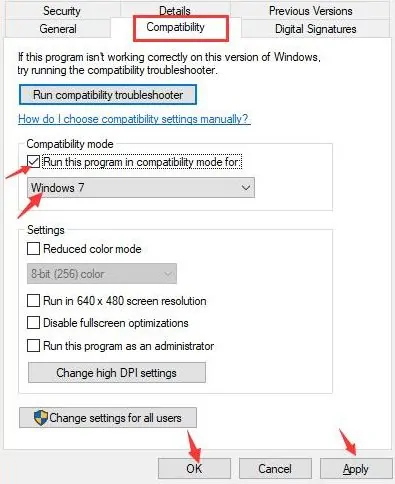
4. Tick the checkbox called Run this program in compatibility mode and select the Windows version you have used before with the driver (Windows 7 would be your first choice).
5. To successfully apply the driver installation changes, click the Apply button and then the OK button.
Solution 4: Using third-party driver-updating Tools
You can also consider some third-party driver-updating software or tools(free or premium as per your choice) to download and install the latest compatible ASIO driver.
1. Download and install any third-party driver updater software of your choice by browsing them over the internet.
2. Open the downloaded driver updater program and search for the missing or outdated driver for your device.
3. Download the latest driver via this third-party tool and install it on your PC.
4. Reboot your computer for the latest driver to take effects for the connected audio devices.
Understanding the ASIO and ASIO4ALL
If the terms ASIO and the ASIO4ALL are confusing you, follow on for a broader understanding of ASIO and ASIO4ALL.
Other related articles from techniedges: